A familiar problem.
Open with the task or hesitation, in language the intended user would recognize.
Content for software & app businesses
Turn a long list of features into a clear reason to care. Create content around a real task, show the relevant product experience, and give the viewer one next step.
Get my free playbookStart with your free brand playbook. No card required.
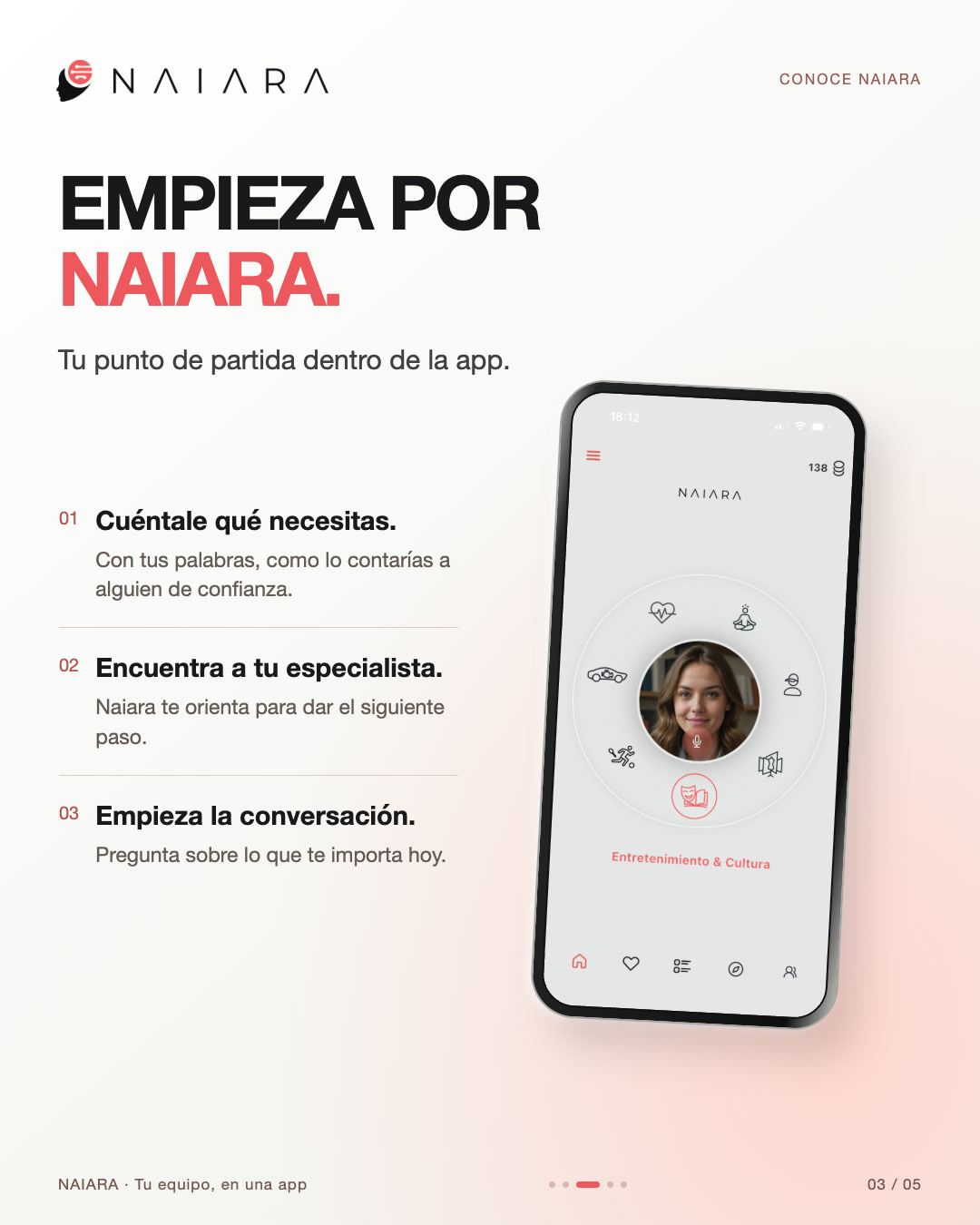
“More than 50 assistants” describes a product. “I have a question and do not know where to start” describes a situation a viewer can recognize. Good software content connects the two without making the viewer decode the interface first.
Choose one audience and one task. An introduction for a new visitor needs different context from an update for an active customer. Avoid trying to explain onboarding, every feature, the pricing model, and the complete product story in one short video.
Open with the task or hesitation, in language the intended user would recognize.
Show a relevant screen, action or example that makes the claim concrete.
Invite the viewer to learn more, try the product or complete a specific task. Match the destination to that invitation.
Supply current screenshots or recordings, an approved description of the feature, and any limits that change the promise. Distinguish something available today from something on the roadmap. If the product offers a free plan or trial, verify the exact conditions before writing the closing scene.
AI-generated visuals can introduce a situation or illustrate an idea. They should not invent functional screens and present them as the actual app. Check menu labels, buttons, mobile layouts and any data shown on screen against the source material.
Our SimpleStudy video breakdown shows how a presenter and product views share the frame. It is a creative example, not a measured conversion case study.
Compare a short app introduction, a five-slide explanation, and a presenter-led video. Each example page includes the finished asset and a breakdown of its sequence.
NAIARA: a 15-second app introduction. Watch the opening presenter, the phone reveal, and the specialist character cards. The Spanish original shows how a broad product idea becomes a short story. It is an introductory marketing video, rather than a step-by-step recording of the app.
NAIARA: a five-slide product carousel. Swipe from the opening question to the product explanation, starting steps, and invitation. This shows how one app can keep its identity across different slide layouts. Check the current product and offer before reusing wording from an earlier campaign.
SimpleStudy: a 15-second presenter-style example. Inspect how the presenter, product views, captions, and closing invitation share the frame. This is illustrative creative with an AI-generated presenter, not a customer testimonial.
The two NAIARA examples belong to the client’s final-approved delivery. That establishes final approval of those assets; it does not establish first-pass accuracy or improved advertising results.
For your own product, review the exact export. Match screens to the supplied product version, check feature and offer wording in the voiceover and captions, and verify the next-step link. Use the product-claims guide to identify supporting evidence and the creative review checklist to record corrections and approval against the final file.
Real client work · NAIARA
19 videos, 11 carousels, 3 images, and 30 stories for a Spanish-market app, produced through an assisted AI workflow.
Start with an introductory video that names the problem. Follow with a carousel explaining the first steps. Use another post to answer a specific objection or clarify who the feature is for. Each piece should stand alone while using the same vocabulary and current product references.
Keep a record of the customer questions behind the content. If people still misunderstand the feature, revise the explanation before making more versions of it. If the next step is unclear, inspect the destination as well as the creative.
Aitoma connects brand and audience research with creative preparation and review. Your team remains the authority on what the software actually does. Use our creative brief to make that handoff explicit.
For a feature release, use the software launch content brief to connect the planned pieces with access conditions, product evidence, and the release owner.
Clear answers before you get started.
Accurate screenshots or recordings are valuable when the content needs to demonstrate real behavior. The source assets required depend on the idea. A presenter introduction needs different material from a detailed walkthrough.
The NAIARA work shown here was produced for the Spanish market. For any new language, review wording, pronunciation, on-screen text and product terminology with someone who can assess the result.
These examples focus on marketing and introductory content. Detailed help documentation, technical claims and complex workflows still need appropriate product review.
Start with a brand playbook that connects your audience, message, and next content ideas.