Watch the coffee brand reel.
The supplied coffee reel moves from an AI presenter to product choices, a pouring scene, and a repeated brand close.
Illustrative brand creative · AI-generated presenter · Approximately 12 seconds.
Explore the editFile details 12.01 seconds · 720 × 1280 px
- Duration
- 12.01 seconds
- Preview dimensions
- 720 × 1280 px
- File format
- MP4
- Audio
- Audio track included
Measured from the web preview files shown here. Confirm your production export requirements in the brief.
Download creative example file details (CSV). Includes file sizes and version identifiers.
Read the visual sequence.
Representative frames from the finished file. Notes describe the visible edit.

The opening pairs a face with a short coffee-focused caption.
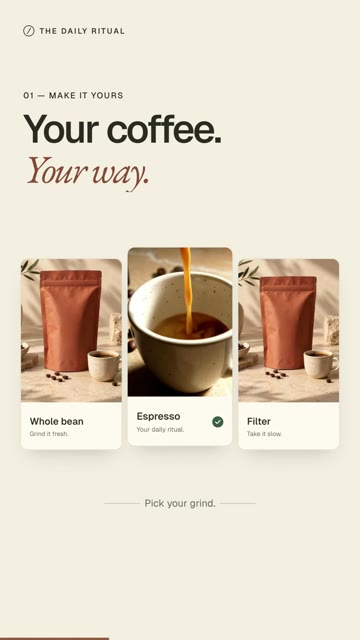
A three-part product composition introduces different preparation references.

The close pouring view gives the product story a sensory moment.

The pack and cup composition brings back the wider brand scene.

The ending maintains the product scene and invitation long enough to resolve the sequence.
The format changes, but the message stays connected.
The presenter opening feels different from the designed product scenes that follow. The repeated coffee context and warm palette connect those changes. The pouring moment adds motion that relates to the product rather than a decorative transition alone.
The visible sequence is useful for briefing: introduction, choice, action, and close. It is not a universal recipe for a successful advertisement. Another product may need a different order or more evidence.
Check the details inside the product tiles.
A choice scene can introduce small labels and product variants. Verify those labels against the actual range and ensure they remain readable on a phone. If the choice needs an explanation that does not fit, move it into a carousel or a longer piece.
The AI presenter is an illustrative speaker, not a customer testimonial. Avoid attributing a real experience or endorsement to a generated person.
Review the complete loop.
The final frame should feel like a completed thought before the clip restarts. Check the audio boundary, the closing hold, caption timing, and continuity between the presenter and product scenes.
Use the storyboard and review worksheets to capture these decisions before producing variants. Each variant should preserve the approved product facts even when the opening or visual treatment changes.
Make your next move specific to your brand.
Start with your free playbook: your audience, what to say, and ideas worth creating.